
Canon has released a new firmware version for Canon EOS 5D Mark II. Click here for details and download.
Showing posts with label CANON 5D MARK II. Show all posts
Showing posts with label CANON 5D MARK II. Show all posts
Sunday, December 20, 2009


Thursday, December 17, 2009
Creating my Twilight feel (Tutorial)

New Twilight Character ")
Originally uploaded by Jun Madayag
This is a shot I have done last October with my favorite teen model Nikki. My objective of this shot was to create an edgy look. so i have lighted the model so.
For the lighting I have used Elinchrome Ranger Quadra positioned on the left and the right side of the model to create the edgy feel.
My Camera setting was:
Camera: Canon EOS 5D Mark II
Exposure: 0.005 sec (1/200)
Aperture: f/5.0
Focal Length: 70 mm
ISO Speed: 200
On post processing I used Photoshop CS3 and the plugin of Niks software. Below is the workflow:
1. Resized the image 8x12
2. levels adjustment: Image>adjustment>levels>options under algorithms click enhance monochromatic contrast then ok. Still on levels go to Channel and shoose blue and adjust the middle slider to left then choose channel red and adjust middle slider to the right. All adjustment is to my taste. Then press ok.
3.Unsharp Mask to remove the hazy look: Filter>sharpen>unsharp Mask>A=20 ar=60
4.Instead of niks software to adjust contrast you can add an adjustment layer and choose Brightnes and contrast and adjust contrast to taste.
5.Flatten the image
6. Final sharpening use this method:
Duplicate Background layer
Background copy
USM 18-40-0
USM 150-.3-0
Edit>Fade USM 100% in Darken Mode
USM 150-.3-0
Edit>Fade USM 50% in Lighten Mode
The final sharpening could create a little noise. If so just add a a layer mask with black and using a white brush tool just reveal the areas you want to appear sharper like eyes, hair,texture of the clothes etc.
Let me know how this works with your image.
Again I am not a pro in PS and what I do is based on what I have learned throughout the years in the net.
Monday, August 17, 2009
Margaret
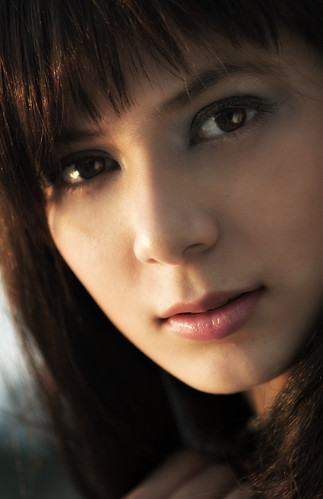
Margaret was the first ever model that I shot back in August last year when I was in the early stage and exploring photography. She left Hong Kong and went to England to study and now she is back for a vacation. A fellow photog invited me to shoot her again and I was so excited.
Here are two of the shot I did in August 2008.
All Natural Light


And here is the shot I made August 16. Oh no I just realized its a little over a year! Its almost an anniversary :P
Natural Light

I used 580 EX II cam left bare and 580 EX II cam right on a portable beauty dish triggered with Pocketwizard Flex and Mini TT1

Hope you guys like it!
Here are two of the shot I did in August 2008.
All Natural Light

And here is the shot I made August 16. Oh no I just realized its a little over a year! Its almost an anniversary :P
Natural Light

I used 580 EX II cam left bare and 580 EX II cam right on a portable beauty dish triggered with Pocketwizard Flex and Mini TT1

Hope you guys like it!
Thursday, August 6, 2009
Executive Shot


A good friend who works at a Financial Wealth Magazine in Indonesia approached me to take an executive shot for her profile in their magazine.
I have decided to take her portrait at LEGCO Central Hong Kong because of the majestic pillars that surrounds the building.
I used my Canon 5D Mark II and Canon 24-70mm F2.8 Lens for this shotand one Canon 580 EX II on a reflector umbrella triggered by Pocketwizard Flex TT5 and Mini TT1.
Monday, July 27, 2009
Baby Aaron
This is the recent shoot I did for a friend Arlene. I had to make a lot of clicks to get a few perfect shots. I didn't know it was this hard to do baby shoot :)
This is the set up

And here are the results


I have used Pocketwizard Flex TT5 and Mini TT1 to trigger my two Canon 580 EX II on ETTL
Here is the flickr link of theses photos.
This is the set up

And here are the results
I have used Pocketwizard Flex TT5 and Mini TT1 to trigger my two Canon 580 EX II on ETTL
Here is the flickr link of theses photos.
Sunday, July 19, 2009


Subscribe to:
Posts (Atom)


 Posts
Posts


